

Anthropic has added two new tools to Claude's growing list of capabilities, targeting data visualization and presentation work. The first, Claude Dashboards, connects to data sources to build dashboards that stay continuously up to date. The second, Claude Motion, transforms complex reports and static charts into short, animated explainer videos.
Claude Dashboards: Ask a question, the panel keeps up
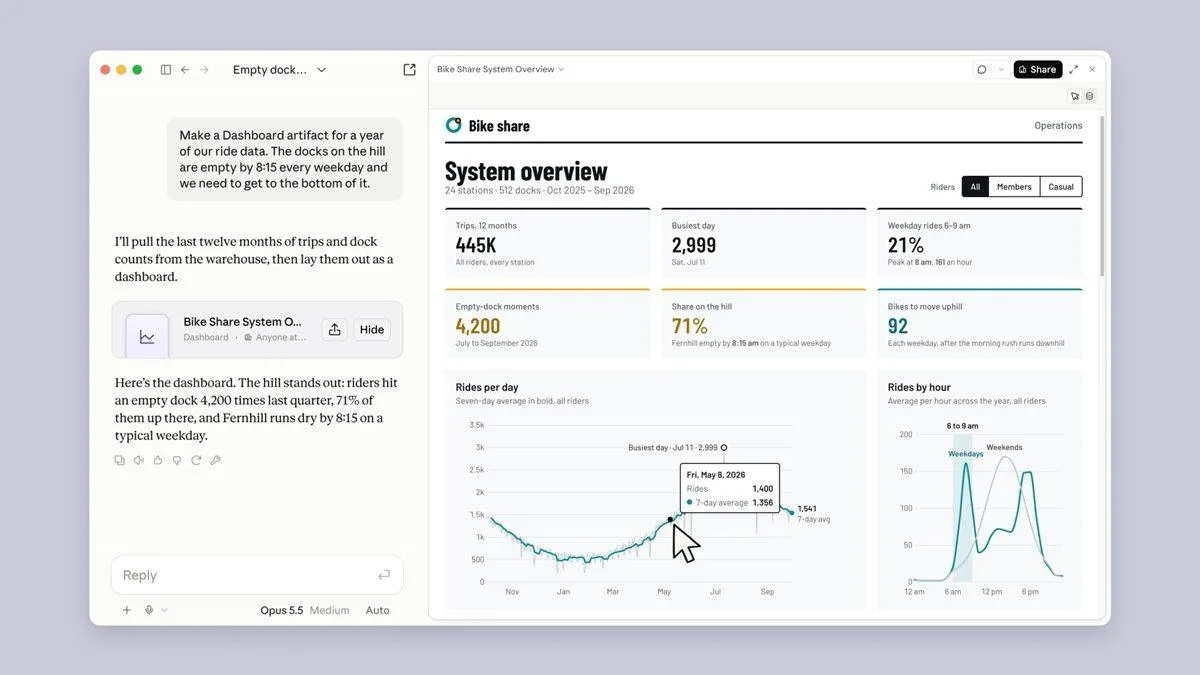
The new dashboard tool integrates directly with companies' enterprise data warehouses and CRM systems. All the user has to do is ask a question in natural language; the system handles the rest. SQL queries are written automatically in the background, charts are drawn, and the panel updates itself as the underlying data changes.
Transparency also appears to have been a priority: right next to every metric, the tool lists the SQL query that produced the data along with the time of the last update.
The tool works with widely used infrastructure including Amazon Redshift, BigQuery, ClickHouse, Databricks, Snowflake and Salesforce. The dashboards it creates can also be exported to platforms such as Amplitude, Grafana, Hex, Mixpanel, Omni, Perplexity, PostHog and Sigma. Support for Looker, monday.com and Tableau is on the way.
Claude Motion: Static charts become videos
Motion focuses on turning quarterly reports into 30-second videos, adding motion to presentation graphics, and putting together quick product demos.
The tool's approach is an interesting one: rather than generating photorealistic scenes or artificial people, it animates text, shapes, images and charts through code. That makes it easy to change a single word, a number, or the length of a scene. Once final edits are done, the work can be downloaded in MP4 format.
Which subscriptions get access?
Both features are currently in beta. Dashboards is available to Pro, Max, Team and Enterprise subscribers, while Motion is, for now, limited to Team and Enterprise accounts.
One notable detail on the enterprise side concerns security preferences: on those accounts, the tools are switched off by default and must be enabled by an administrator before they can be used.





Comments (0)
No comments yet. Be the first!