

YouTube is rolling out its AI-powered "Ask YouTube" tool on mobile apps, aiming to change how people search. Android and iOS users can now search by asking questions in natural language.
The tool was unveiled at Google I/O last May and tested with Premium subscribers. After web and smart TVs, it's now mobile's turn.
What does it offer?

Natural language replaces keywords. Users ask a single question and continue with follow-ups on the answer, turning search into a conversation.
The feature isn't limited to the search bar. It's being expanded to cover Shorts and live streams alongside standard videos.
How to use it on mobile
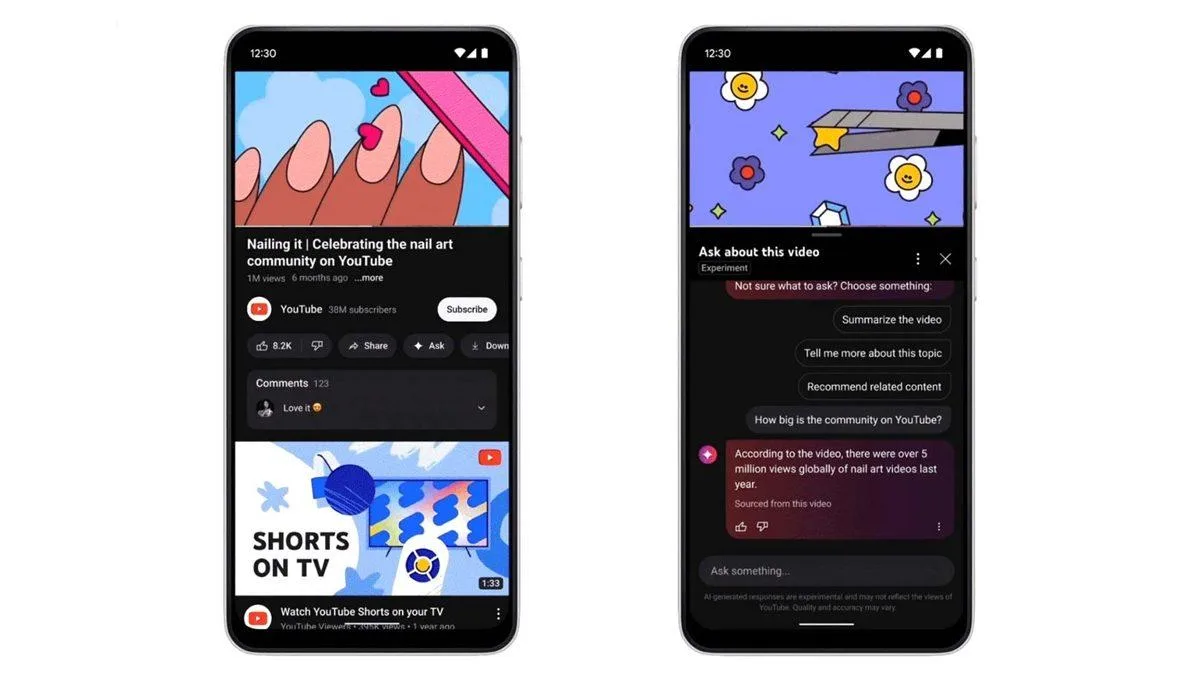
- Search screen: Tap the search icon, then the "Ask" button that appears. You can submit your question by text or voice; the answer arrives interactively with video clips.
- Video playback screen: Tap the "Ask" button with the Gemini sparkle icon, located between the "Share" and "Download" buttons below the player.
- Contextual suggestions: When you tap the button, generative AI offers ready-made prompts like "Summarize the video" based on what you're watching. You can also type your own question in the text box.
Currently available to users in the US, the feature is expected to roll out worldwide soon.



Comments (0)
No comments yet. Be the first!