

WhatsApp is quietly overhauling the navigation of its Android app. A new Contacts tab, added to the bottom navigation bar, gathers everyone who is currently online onto a single screen — and in its first rollout, it is taking the place of the existing Communities tab.
The feature was first spotted in Android beta version 2.26.40.3, and it began reaching selected testers with the 2.26.45.2 beta update distributed via the Google Play Store. The idea is simple: instead of scrolling up and down through the chat list to see who is around, users can jump straight to their most recently active contacts.
What the Contacts tab offers
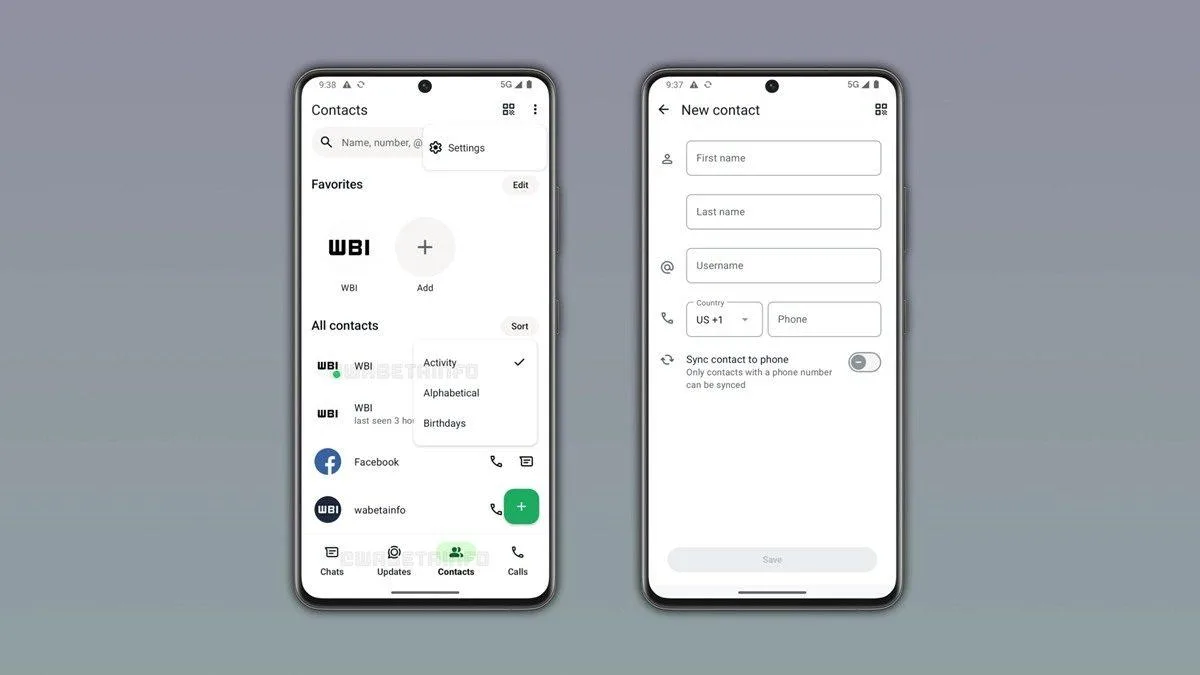
At the top of the tab sit the contacts you have marked as favorites, so pinned people are just one tap away from an instant chat. Below the favorites, the full contact list appears.
That list can be sorted alphabetically, by birthdays, or by activity status. When the "Activity" sorting option is selected, contacts who are online are moved to the top of the list with a green dot indicator. Those who are offline are arranged by their last seen time, to the extent that privacy settings allow.
Meta AI shortcut and adding contacts
At the bottom of the list there is a shortcut for starting a chat with Meta AI. Because Meta AI is available at all times, its icon carries a permanent green dot. The same section also includes options to send an invite link to other apps and to invite Instagram followers to WhatsApp.
Anyone wanting to add a new contact can use the floating action button in the bottom-right corner of the screen. The form that opens accepts a first name, last name, username and phone number. Syncing with the phone's address book applies here too, although WhatsApp can only save contacts entered with a phone number to the device's address book.






Comments (0)
No comments yet. Be the first!