

WhatsApp continues to beef up its image editing tools on Android. A new AI feature built into the app can transform photos into 9:16 vertical format with a single tap.
The tool, embedded in the drawing editor, runs on Meta AI infrastructure. That means users can share images in chats or status updates without cropping or stretching them — the missing edges are filled in naturally by AI.
How does the AI expansion work?
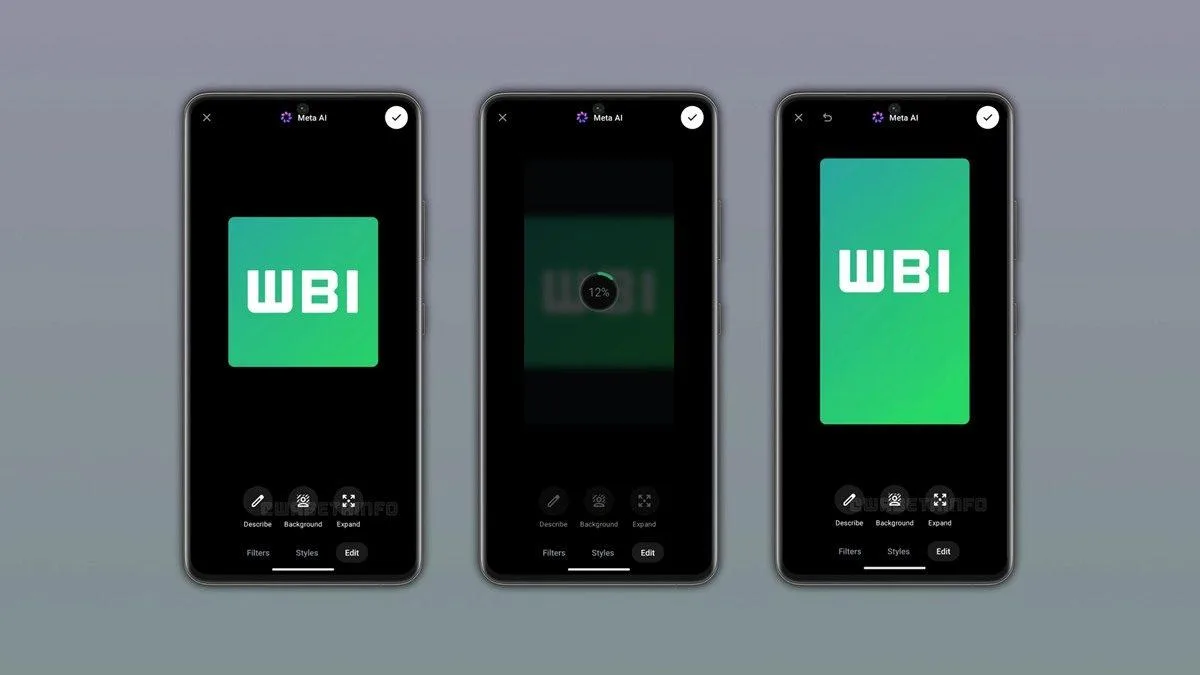
Rather than simply stretching a photo to fit the screen, the feature analyzes the image's content. The AI understands the context of the frame and generates the areas beyond its edges from scratch, producing a taller 9:16 image that stays consistent with the original photo. The quality of the generated expansion varies depending on the clues the details along the frame's edges give the AI.
Using the tool is straightforward: open a photo in the drawing editor, swipe up on the interface and select the expand option under the "Edit" section. The process takes just a few seconds; users can accept the result or try generating an alternative version.
Which photos can it be used on?
The expand button only appears on images with suitable aspect ratios. A photo that is already 9:16 vertical has no empty space to fill, so the button isn't offered. Those wanting to try the feature are advised to go with square (1:1) photos, since square frames can be turned into vertical images that fill the entire screen.
The new tool was designed for both chat sharing and status updates. However, depending on the scope of the ongoing tests, some users may see the tool only in chats, while others may see it only on the status screen.





Comments (0)
No comments yet. Be the first!